Introduction
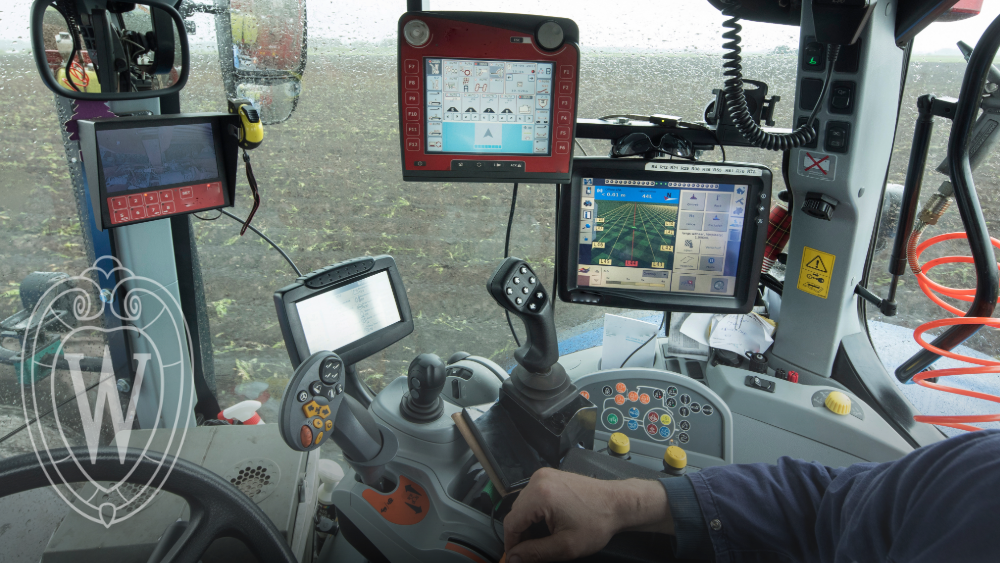
Managing the large amounts of data that is gathered, transmitted, stored, and analyzed on a modern working dairy, crop, or livestock farming operation or agricultural business can feel overwhelming. Collecting data in the form of numbers, documents, videos, photos, spreadsheets, and other forms is relatively easy to do. Effectively organizing, storing, and backing up data appropriately is a task that is not as easy and requires some careful thinking and planning. Many producers get overwhelmed, storing information on old phones and computers, scattered backup drives including USB jump drives stashed away in desk drawers or shoeboxes. But if operators hope to make sound business decisions and keep effective longer term records connected to their operation and other personal and family matters, a sound, systematic strategy is required. This article outlines several steps you can take to improve data management, security, and ensure timely access to the information you need, when and where you need it.
Managing Growing Volumes of Farm Data
Agriculture has long been a data-intensive industry. Even a century ago, crop producers kept records of yield, inputs, seed performance, and crop rotations. Dairy and livestock producers had a good sense of each animal’s production, health status, overall input expenses, and long-term herd performance. However, the ability to collect, store, and analyze even more data through sensors and other digital devices has rapidly accelerated in recent years due to technological advancements. This information plays a critical role in decision-making, financing, marketing, future planning, and performance evaluation.
Data can now be generated by a wide range of sources, such as:
- Yield monitor and GIS data (field maps, geographies, and terrains)
- UAV (Unmanned Aerial Vehicle) imagery — visual data from photos or videos captured by drones
- Milk production, DHI records, genetic reports, and feed consumption data for individual animals
- Data generated by robotic and highly automated production systems for tasks like feeding and milking
- Wearable technology (such as collars on animals that monitor health or production data or devices like smart watches on people)
- Photos and videos
- Nutrient management documentation (fertility reports, management calculations, program outputs)
- Receipts, inventory information, invoices, tax documents, and other key financial records and reports
Farms that use even basic digital technology to manage production must store and manage massive volumes of data. These needs will only grow in the future. In a 2019 study, UW researchers found that a typical dairy operation collects, stores, and manages about 73 MB of production-related data per cow each year. This means that a 1000-cow herd can be characterized at that time by 73 GB of data annually. In precision row-crop production, one acre of a crop like corn or soybeans will generate over 20 MB of data, meaning 1000 acres require 20 GB of storage. In a single season, even a modest size business is likely to generate more data than a modern smartphone can hold. These numbers seem small by today’s standards, where a person can purchase a 1TB hard drive for under $100, but we need to remember that farm operations are dynamic.
The ability to collect data will continue to increase rapidly over time. Data collected this year will have future value, but as we store it, we need to remember that more data will be piled on top of it every day. Data volumes also fluctuate depending on the season, the specific crop, or the animals’ life stage.
Data Security and Privacy Concerns
In the same 2019 study cited earlier, data security and privacy were identified as the biggest barriers to technology adoption among more than 1,000 dairy, livestock, and crop producers. A companion study conducted in 2022 with agribusiness professionals and Extension educators reinforces this concern. These findings highlight that farm data often needs to be shared securely with industry professionals either through the transfer of physical devices (like jump drives) or through uploads. Note that uploading needs and capabilities will only increase in the future, further driving the need for affordable and reliable broadband capacity, a need that may serve to limit farm modernization in the future. Data can include images, financial information, production data, DHI data, and diagnostic information.
Producers concerned about data security and privacy are well justified in their caution. Data tied to a farm operation is irreplaceable if it is lost through degradation, corruption, tampering, or theft. Historical records documenting management decisions, production history, and changes over time have economic value. When cropland is sold or rented, a ten-year record of yields, inputs, and management practices allows the seller, buyer, landowner, and tenant to place a more accurate market value on that land. Beyond that, private companies increasingly seek to aggregate large volumes of farm data. These data are analyzed, repackaged, and sold as decision-support tools and other commercial products. From a security and privacy standpoint, this makes it essential to protect your data, control who has access to it, and be deliberate about when and how it is secured and shared.
The Basics of Data Management
Having gathered and inventoried the data associated with your farm/business, it is time to back it up securely. We recommend a well-respected framework from the United States Cybersecurity and Infrastructure Security Agency (CISA). This common strategy provides a practical framework to reduce risk of data loss from computer storage failures, disasters, theft, or other unexpected events. This strategy is the “3-2-1 recommendation.” Specifically, take action to:
- Keep THREE total copies of all important data files: one should be the original, with two independent but identical backups.
- Store backup digital information on TWO different types of media to minimize the risk of loss from a single device or storage system failure.
- Keep ONE copy off-site, outside of the home, farm or business
Here is an example of how a farm business might employ the 3-2-1 principle.
- Scan your original paper file, and store it on the hard disk of your main computer in an organized file (see below for organization strategies).
- Backup the file onto a “portable” external disk that you can keep in a secure location such as a locked, fire-resistant file cabinet or safe.
- Upload a third copy to a secure, offset, cloud-based storage service.
Uploading Farm Data to the Cloud
Typical modern data management strategies for most businesses include some form of secure “cloud storage.” Cloud-stored files are saved on off-site computers run by a third-party company like Google, Apple, or Microsoft, rather than on your own device. When you save or upload to the cloud, you transmit a copy of the file over the Internet to an offsite computer, where it resides in a space you control and can access. Services vary across providers. Factors to look for include encryption (protection of data while being transmitted), backups by the provider, and the ability to track different versions of files as they change.
Most cloud services allow you to access your files with any connected device, including a computer, tablet, or smartphone. If your phone or computer is lost, stolen, or stops working, a properly configured cloud storage service may allow you to recover files you’ve stored there. Backup, redundancy, file recovery, and security practices vary among providers, so these features should be considered when choosing a cloud-based storage service.
With many cloud storage services, you pay a monthly fee based on the amount of data stored or the features provided. A carefully selected and properly configured service can provide a secure and convenient component of an overall data-management strategy. Again, note that data transfer to and from cloud storage requires high speed internet access. If you are limited on daily, weekly, or monthly uploads, consider different methods to compress files for more efficient storage.
There are many cloud-based data storage products available at a relatively low cost. Examples include IDrive, Microsoft OneDrive, Google Drive, and Dropbox. Compare costs (per GB or TB of storage), security practices and protocols, and support provided. Also check the terms of service with cloud-based providers related to data sharing, and what happens to data in a situation in which you might miss a payment or decide to downgrade to a less expensive plan. As you compare different services, factors to consider include: cost, backup speed, number of devices that can be backed up into a single account, and other metrics.
File Organization and Naming
As you organize your data, it is also a good time to clean up and organize your file and folder structure and protocols for naming folders and files. Keeping your farm and business records organized makes it easier for you and your team to find what you need quickly. While there’s no single “correct” way to organize files, following a few best practices will save time and reduce frustration. Set up folders in a way that makes sense for your farm or business. Every operation will be different. The goal is to make it easy for anyone on your team to locate a file. File names should be consistent and somewhat descriptive. Below are some recommendations to help with clarity and searchability.
| Do This | Not This |
|---|---|
| Herd_Health_Forms | Herd Health Forms |
| Yield-Monitor-Data | Yield Monitor Data |
| FieldLevelSoilTestResults | Field Level Soil Test Results |
| Do This | Not This |
|---|---|
| 20250614_Milk_Yield | June_14_25_Milk_Yield |
| 2023-07-26_SW80_SoilTestResults | July2623 SW80 Soil Test Results |
| Do This | Not This |
|---|---|
| Cow_439_Health_Record | Cow_#439_Health_Record |
| Payroll-Records-2025 | $PayrollRecords$2025 |
| Do This | Not This |
|---|---|
| 2025-Crop-Rotations-All-Fields |
2025-Planned-Crop-Rotations-All-Fields-With –Nutrient-Applications-Plans |
| 2024-Hail_Damage_Documentation | SomeWeatherStuffPicturesandOtherThings |
File Storage Organization Strategies
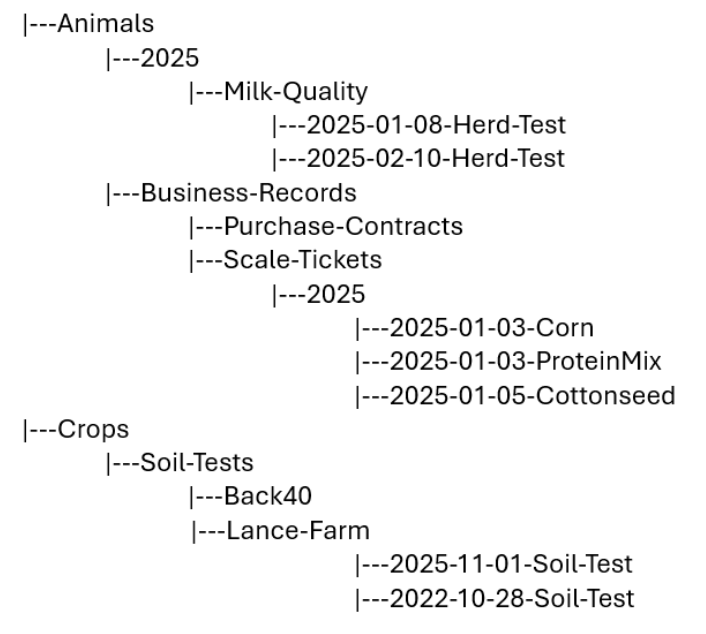
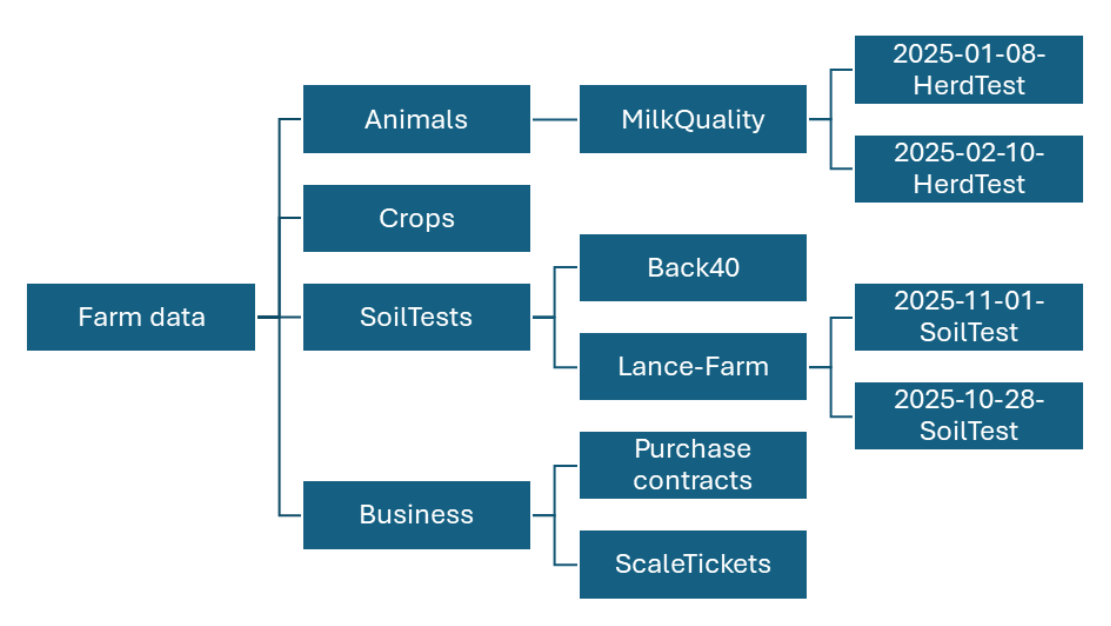
Storing files in an organized manner can make it easier to find key information and will simplify file management and backups. The right system will depend on your needs, but here is an example of how these steps might look for farm data. Keep in mind that there are many effective approaches. Choose a system that makes sense for your operation, and pay attention to keeping similar files under a single or a small number of folders. This makes it easier and faster to copy or back up entire sections of your data, rather than collecting files from many different locations.
Farm Data
Farm Data Agreements and Private Companies
Farm data doesn’t just stay on the farm or in your cloud storage anymore. Many companies offer products and services that offer to collect, store, analyze, and make recommendations from the specific data from your operation. With this comes important questions about how that data is collected, used, shared, and protected. It is important to remember that nothing is “totally free.” If a company is offering free storage space, data collection, or analysis services, it is important to understand what types of value they are gleaning from your information. Here are some critical questions to ask:
- What specific data is the company collecting?
- To what extent is personally-identifiable or business level information connected to the data they are handling.
- Are they using your data for other purposes? If so, what are those purposes and what are the tradeoffs that might be of benefit to you AND the service?
- When data is gathered, stored, or analyzed from your operation, who owns it?
- What rights do you maintain connected to the use and value associated with your data, and can you revoke the rights of other entities if you choose to stop working with a vendor that you are sharing data with?
- How and with whom could your data be shared or sold by third parties including your vendor or others?
- What happens and how are you protected in the event of a data security breach? Are you notified if data is ever compromised? What other data security protections are in place?
When choosing to work with vendors of any type that use, collect, and work with your data, ask whether they have earned the Ag Data Transparent (ADT) Seal of Approval. This approval is the result of work by the American Farm Bureau Federation and other agricultural commodity organizations, farm and ranch associations, and agriculture technology providers, to establish the “Privacy and Security Principles for Farm Data.” Even if a company that you are considering is not following these principles and carrying the ADT “seal,” the ADT principles and questions are a great starting point for conversations with any ag tech provider you use or are considering.
Additional Recommendations to Secure and Protect Your Data
Password protection is an absolute must with your farm data and any other type of data, device, or digital system that you use on the farm. As the U.S. Cybersecurity and Infrastructure Security Agency (CISA) recommends, strong passwords are an absolute must. Strong passwords are described by CISA as being long (at least 16 characters), random, and unique. CISA also recommends the use of a reputable password manager rather than writing your passwords down in locations where they can be stolen or compromised.
CISA also strongly recommends the use of “Multi Factor Authentication” or MFA. MFA provides the user with an extra, independent security layer. To log in and gain access to an account on a cloud based file storage service (or financial account or other system), you are required to confirm your identity. This might involve approving a request on your smartphone through an authenticator app, entering a one-time code, using a security key, or receiving a code by text message. CISA recommends using stronger, phishing-resistant MFA methods when they are available.
Consider the “What if I’m Not Here?” Question
Sadly, there may come a time when your family members or others associated with your operation need to access your farm, business, and financial data without you being able to help. This need often comes at a stressful time, in the event of an illness, injury, death or other event that leaves you unable to provide important access information. So, as you work through these steps to gather, store, and secure your data, involve other trusted persons in the process. As your protocols change or as you move files, change providers, or change your security strategies, make sure your trusted partners can still access your information. This is a vital step in business continuity planning and farm and ranch succession planning.
Conclusion
Our world is changing at speeds never imagined. Farming and other agricultural businesses are increasingly becoming “data businesses,” and the data we collect, process, store, and analyze to support key decisions in our business and within our family is vital to long-term success. This can feel overwhelming. However, by applying the recommendations, practices, and steps outlined in this article, you can make data management more manageable, improve security, and ensure timely access to the information you need, when and where you need it.
Published: Oct. 9, 2026
Reviewed by: Carolina Pinzon, Bilingual Dairy Outreach Specialist, and Stephanie Plaster, Farm Business Development Outreach Specialist, UW-Madison Division of Extension
References
- Ag Data Transparent. (no date). Core principles. https://www.agdatatransparent.com/principles
- Briney, K. A. (2020). File naming convention worksheet [Worksheet]. CaltechAUTHORS – Caltech Library. https://doi.org/10.7907/894q-zr22
- Cybersecurity and Infrastructure Security Agency. (no date). Require multifactor authentication. U.S. Department of Homeland Security. https://www.cisa.gov/audiences/small-and-medium-businesses/secure-your-business/require-multifactor-authentication
- Cybersecurity and Infrastructure Security Agency. (no date). Require strong passwords. U.S. Department of Homeland Security. https://www.cisa.gov/audiences/small-and-medium-businesses/secure-your-business/require-strong-passwords
- Cybersecurity and Infrastructure Security Agency. (2025, August 29). Level up your defenses: Four cybersecurity best practices for businesses. U.S. Department of Homeland Security. https://www.cisa.gov/resources-tools/resources/level-your-defenses-four-cybersecurity-best-practices-businesses
- DATACC. (no date). Naming files and managing versions: Good habits. https://www.datacc.org/en/organising-your-work/naming-files-managing-versions-good-habits/
- Drewry, J. L., Shutske, J. M., Trechter, D., Luck, B. D., & Pitman, L. (2019). Assessment of digital technology adoption and access barriers among crop, dairy and livestock producers in Wisconsin. Computers and Electronics in Agriculture, 165, 104960. https://doi.org/10.1016/j.compag.2019.104960
- Drewry, J. L., Shutske, J. M., Trechter, D., & Luck, B. D. (2022). Assessment of digital technology adoption and access barriers among agricultural service providers and agricultural extension professionals. Journal of the ASABE, 65(5), 1049-1059. https://doi.org/10.13031/ja.15018
- York University. (no date). Tip sheet 6: Naming conventions for electronic files and folders. Information and Privacy Office. https://www.yorku.ca/unit/ipo/tool-and-tips/tip-sheet-6-naming-conventions-for-electronic-files-and-folders/
AI Use Disclosure: Generative AI (Gemini and ChatGPT) was used to review a detailed outline developed by the authors and suggest areas where additional coverage might be needed, to assist with final draft editing and corrections, and to format and verify references.